
外观
Gemini 生图
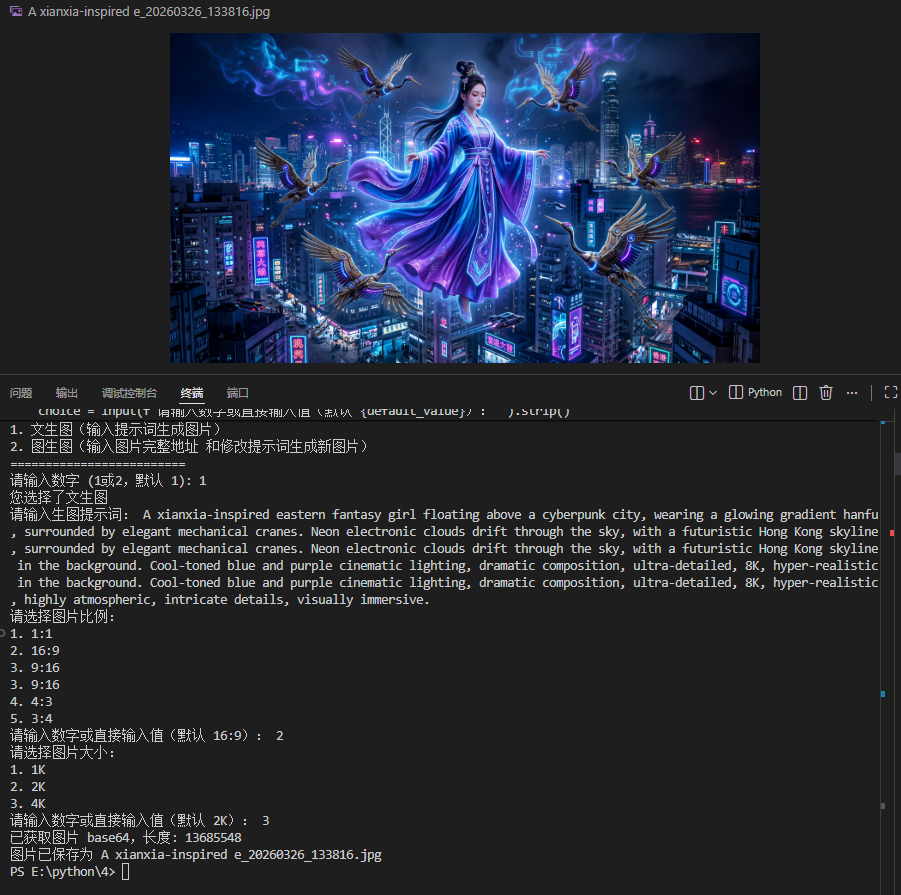
支持文生图和图生图。下面这份 Python 脚本可以直接用:填入密钥,运行后按提示选择方式、比例和尺寸即可。
模型限制
脚本只支持 gemini-3.1-flash-image,请确认你的密钥所在分组包含这个模型(见 可用渠道)。
使用方法
- 安装依赖:
pip install requests - 把下面的代码保存为
gemini_image.py,把API_KEY换成你的密钥 - 运行
python gemini_image.py,按提示操作;生成的图片保存在脚本所在目录
接口说明
- 地址:
https://api.solov.cc/v1beta/models/gemini-3.1-flash-image:generateContent - 鉴权:
Authorization: Bearer <你的密钥> - 文生图:
contents[0].parts放文本;图生图:先放inlineData(base64 图片)再放文本 generationConfig.imageConfig里aspectRatio支持 1:1 / 16:9 / 9:16 / 4:3 / 3:4,imageSize支持 1K / 2K / 4K
脚本
python
import requests
import base64
import json
import re
import time
import mimetypes
from pathlib import Path

API_KEY = "换成你在星芒AI创建的API密钥"
MODEL_NAME = "gemini-3.1-flash-image" #限制只能使用这个模型
BASE_URL = "https://api.solov.cc"
ASPECT_RATIO_OPTIONS = {
    "1": "1:1",
    "2": "16:9",
    "3": "9:16",
    "4": "4:3",
    "5": "3:4",
}
IMAGE_SIZE_OPTIONS = {
    "1": "1K",
    "2": "2K",
    "3": "4K",
}

def current_time_text():
    return time.strftime("%Y-%m-%d %H:%M:%S")

def read_response_body_with_progress(response, chunk_size=64 * 1024):
    content_length = response.headers.get("Content-Length", "").strip()
    total_bytes = int(content_length) if content_length.isdigit() else 0
    chunks = []
    downloaded = 0
    download_start = time.perf_counter()
    last_report = 0.0

    if total_bytes > 0:
        print(
            f"[{current_time_text()}] 开始下载响应体,预计大小: {total_bytes / (1024 * 1024):.2f} MB"
        )
    else:
        print(
            f"[{current_time_text()}] 开始下载响应体,服务器未返回 Content-Length,无法显示总量和百分比"
        )

    for chunk in response.iter_content(chunk_size=chunk_size):
        if not chunk:
            continue
        chunks.append(chunk)
        downloaded += len(chunk)

        now = time.perf_counter()
        if now - last_report >= 0.5:
            downloaded_mb = downloaded / (1024 * 1024)
            if total_bytes > 0:
                percent = downloaded / total_bytes * 100
                total_mb = total_bytes / (1024 * 1024)
                print(
                    f"\r[{current_time_text()}] 下载进度: {downloaded_mb:.2f}/{total_mb:.2f} MB ({percent:.1f}%)",
                    end="",
                    flush=True,
                )
            else:
                print(
                    f"\r[{current_time_text()}] 已下载响应体: {downloaded_mb:.2f} MB",
                    end="",
                    flush=True,
                )
            last_report = now

    download_elapsed = time.perf_counter() - download_start
    downloaded_mb = downloaded / (1024 * 1024)
    if total_bytes > 0:
        total_mb = total_bytes / (1024 * 1024)
        print(
            f"\r[{current_time_text()}] 响应体下载完成: {downloaded_mb:.2f}/{total_mb:.2f} MB,耗时: {download_elapsed:.2f} 秒"
        )
    else:
        print(
            f"\r[{current_time_text()}] 响应体下载完成: {downloaded_mb:.2f} MB,耗时: {download_elapsed:.2f} 秒"
        )

    return b"".join(chunks)

def post_with_timing(api_url, headers, payload, timeout=1200):
    start_time = time.perf_counter()
    print(f"[{current_time_text()}] 开始请求,正在等待服务端生成并返回图片...")
    try:
        response = requests.post(api_url, headers=headers, json=payload, timeout=timeout, stream=True)
    except requests.RequestException:
        elapsed = time.perf_counter() - start_time
        print(f"[{current_time_text()}] 请求失败,耗时: {elapsed:.2f} 秒")
        raise

    header_elapsed = time.perf_counter() - start_time
    print(f"[{current_time_text()}] 已收到响应头,状态码: {response.status_code},耗时: {header_elapsed:.2f} 秒")
    try:
        body_bytes = read_response_body_with_progress(response)
    finally:
        response.close()

    total_elapsed = time.perf_counter() - start_time
    print(f"[{current_time_text()}] 请求处理完成,总耗时: {total_elapsed:.2f} 秒")
    return response.status_code, body_bytes

def extract_image_base64_and_mime(data):
    for candidate in data.get("candidates", []):
        for part in candidate.get("content", {}).get("parts", []):
            inline_data = part.get("inlineData") or part.get("inline_data")
            if isinstance(inline_data, dict) and inline_data.get("data"):
                mime_type = inline_data.get("mimeType") or inline_data.get("mime_type") or "image/png"
                return inline_data["data"], mime_type

            text = part.get("text")
            if isinstance(text, str):
                match = re.search(
                    r"data:(image/[\w.+-]+);base64,([A-Za-z0-9+/=\s]+)",
                    text,
                )
                if match:
                    mime_type = match.group(1)
                    image_base64 = re.sub(r"\s+", "", match.group(2))
                    return image_base64, mime_type

    raise ValueError("响应中没有找到图片 base64 数据")

def get_output_filename(text, mime_type):
    extension_map = {
        "image/jpeg": "jpg",
        "image/png": "png",
        "image/webp": "webp",
    }
    extension = extension_map.get(mime_type, mime_type.split("/")[-1].split("+")[0])
    safe_text = re.sub(r'[<>:"/\\|?*]', "_", text.strip()[:20]) or "output"
    return f"{safe_text}{time.strftime('_%Y%m%d_%H%M%S')}.{extension}"

def encode_image_file(image_path):
    path = Path(image_path).expanduser()
    if not path.is_file():
        raise FileNotFoundError(f"图片文件不存在: {path}")

    mime_type, _ = mimetypes.guess_type(path.name)
    if not mime_type or not mime_type.startswith("image/"):
        extension_map = {
            ".jpg": "image/jpeg",
            ".jpeg": "image/jpeg",
            ".png": "image/png",
            ".webp": "image/webp",
            ".gif": "image/gif",
            ".bmp": "image/bmp",
        }
        mime_type = extension_map.get(path.suffix.lower())

    if not mime_type:
        raise ValueError(f"无法识别图片 MIME 类型: {path.name}")

    image_base64 = base64.b64encode(path.read_bytes()).decode("utf-8")
    return mime_type, image_base64

def select_option(title, options, default_key):
    print(title)
    for key, value in options.items():
        print(f"{key}. {value}")

    default_value = options[default_key]
    while True:
        choice = input(f"请输入数字或直接输入值(默认 {default_value}): ").strip()
        if not choice:
            return default_value
        if choice in options:
            return options[choice]

        normalized_choice = choice.upper()
        for value in options.values():
            if normalized_choice == value.upper():
                return value

        print("输入无效,请重新选择")

def choose_image_config():
    aspect_ratio = select_option("请选择图片比例:", ASPECT_RATIO_OPTIONS, "2")
    image_size = select_option("请选择图片大小:", IMAGE_SIZE_OPTIONS, "2")
    return aspect_ratio, image_size

def text_to_image():
    text = input("请输入生图提示词: ")
    aspect_ratio, image_size = choose_image_config()
    api_url=f"{BASE_URL}/v1beta/models/{MODEL_NAME}:generateContent"
    payload = {
        "contents": [{
            "parts": [
                {"text": text}
            ]
        }],
        "generationConfig": {
            "responseModalities": ["IMAGE"],
            "imageConfig": {
                "aspectRatio": aspect_ratio,
                "imageSize": image_size
            }
        }
    }

    headers = {
        "Authorization": f"Bearer {API_KEY}",
        "Content-Type": "application/json"
    }
    status_code, response_body = post_with_timing(api_url, headers, payload, timeout=1200)

    if status_code == 200:
        data = json.loads(response_body.decode("utf-8", errors="replace"))
        image_base64, mime_type = extract_image_base64_and_mime(data)
        print(f"已获取图片 base64,长度: {len(image_base64)}")

        # 保存图片
        output_filename = get_output_filename(text,mime_type)
        with open(output_filename, "wb") as f:
            f.write(base64.b64decode(image_base64))
        print(f"图片已保存为 {output_filename}")
    else:
        print(f"请求失败: {status_code}")
        print(response_body.decode("utf-8", errors="replace"))

def image_to_image():
    image_path = input("请输入要修改的图片完整路径: ")
    prompt = input("请输入修改提示词: ")
    aspect_ratio, image_size = choose_image_config()
    source_mime_type, source_image_base64 = encode_image_file(image_path)

    api_url=f"{BASE_URL}/v1beta/models/{MODEL_NAME}:generateContent"
    payload = {
        "contents": [{
            "parts": [
            {
                "inlineData": {
                "mimeType": source_mime_type,
                "data": source_image_base64
                }
            },
            { "text": prompt }
            ]
        }],
        "generationConfig": {
            "responseModalities": ["IMAGE"],
            "imageConfig": {
            "aspectRatio": aspect_ratio,
            "imageSize": image_size
            }
        }
    }

    headers = {
        "Authorization": f"Bearer {API_KEY}",
        "Content-Type": "application/json"
    }
    status_code, response_body = post_with_timing(api_url, headers, payload, timeout=1200)

    if status_code == 200:
        data = json.loads(response_body.decode("utf-8", errors="replace"))
        image_base64, mime_type = extract_image_base64_and_mime(data)
        print(f"已获取图片 base64,长度: {len(image_base64)}")

        # 保存图片
        output_filename = get_output_filename(prompt,mime_type)
        with open(output_filename, "wb") as f:
            f.write(base64.b64decode(image_base64))
        print(f"图片已保存为 {output_filename}")
    else:
        print(f"请求失败: {status_code}")
        print(response_body.decode("utf-8", errors="replace"))
def main():
    print("=========================")

    print("请选择生图方式:")
    print("1. 文生图(输入提示词生成图片)")
    print("2. 图生图(输入图片完整地址 和修改提示词生成新图片)")
    print("=========================")
    while True:
        choice = input("请输入数字 (1或2,默认 1): ").strip()
        if choice in ["1", ""]:
            choice = "1"
            break
        elif choice == "2":
            choice = "2"
            break
        print("输入无效,请重新选择")

    if choice == "1":
        print("您选择了文生图")
        text_to_image()
    elif choice == "2":
        print("您选择了图生图")
        image_to_image()

if __name__ == "__main__":
    main()